Description
Contact Form 7 Storage stores all Contact Form 7 submissions (including attachments) in your WordPress database (DB). All contact form entries and business leads are stored safely even if the e-mail notifications go missing or get deleted.
New in 2.0.0: Settings for disabling user meta data storage (for GDPR compliance purposes) and form export settings to specify which fields are included in the export.
GDPR Compliance
While this plugin doesn’t guarantee GDPR compliance, it offers the following functionality to help with that:
- Easily delete form entry data, meta information and uploaded attachments.
- Disable storing user IP address and browser information.
Features
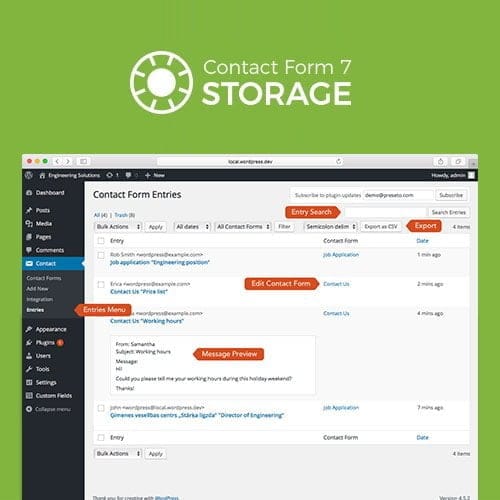
All form submissions are stored in the WordPress backend in addition to being sent via e-mail. E-mail delivery is never 100% reliable and having a backup of all contact entries will ensure you never miss a lead or inquiry.
Export form submissions as CSV for Excel. Export all submissions or use the date and form filters to select which entries you want to export. Export also includes links to entry attachments.
All form submissions are stored in the WordPress backend in addition to being sent via e-mail. E-mail delivery is never 100% reliable and having a backup of all contact entries will ensure you never miss a lead or inquiry.
Export form submissions as CSV for Excel. Export all submissions or use the date and form filters to select which entries you want to export. Export also includes links to entry attachments.
Each entry stores the following details about the submission:
- Individual input field values (also available as individual columns in the exported CSV files).
- All attachments uploaded to the contact form.
- Time and date of the entry.
- E-mail address of the contact form recipient.
- Subject line of the e-mail that was sent to the contact form recipient.
- Post or page URL where the contact form was submitted (referer).
- IP address, browser and device information (user-agent) of the submission.
- Link to the configuration page for the contact form that was used for submission.
Product Version & Update Information
If you want to check the current version of the product or request the latest update, you can do so easily.
Contact us on WhatsApp or submit the update request form below.
We process all requests promptly to ensure smooth experience for ThemePluginBD customers.
Check Version & Request Update via WhatsApp
For instant verification of the current product version or to request the latest update, contact our support team on WhatsApp.
Please mention your product name or order ID for faster assistance.
Contact on WhatsApp
Request Version Info & Updates via Form
Prefer receiving information or updates via email?
Submit the form below to either check the current version or request the latest update file.
Ensure you provide the correct email address so we can respond quickly.
ThemePluginBD ensures 100% genuine and malware-free products.
All version checks and updates are handled securely and delivered promptly.

















Reviews
There are no reviews yet.